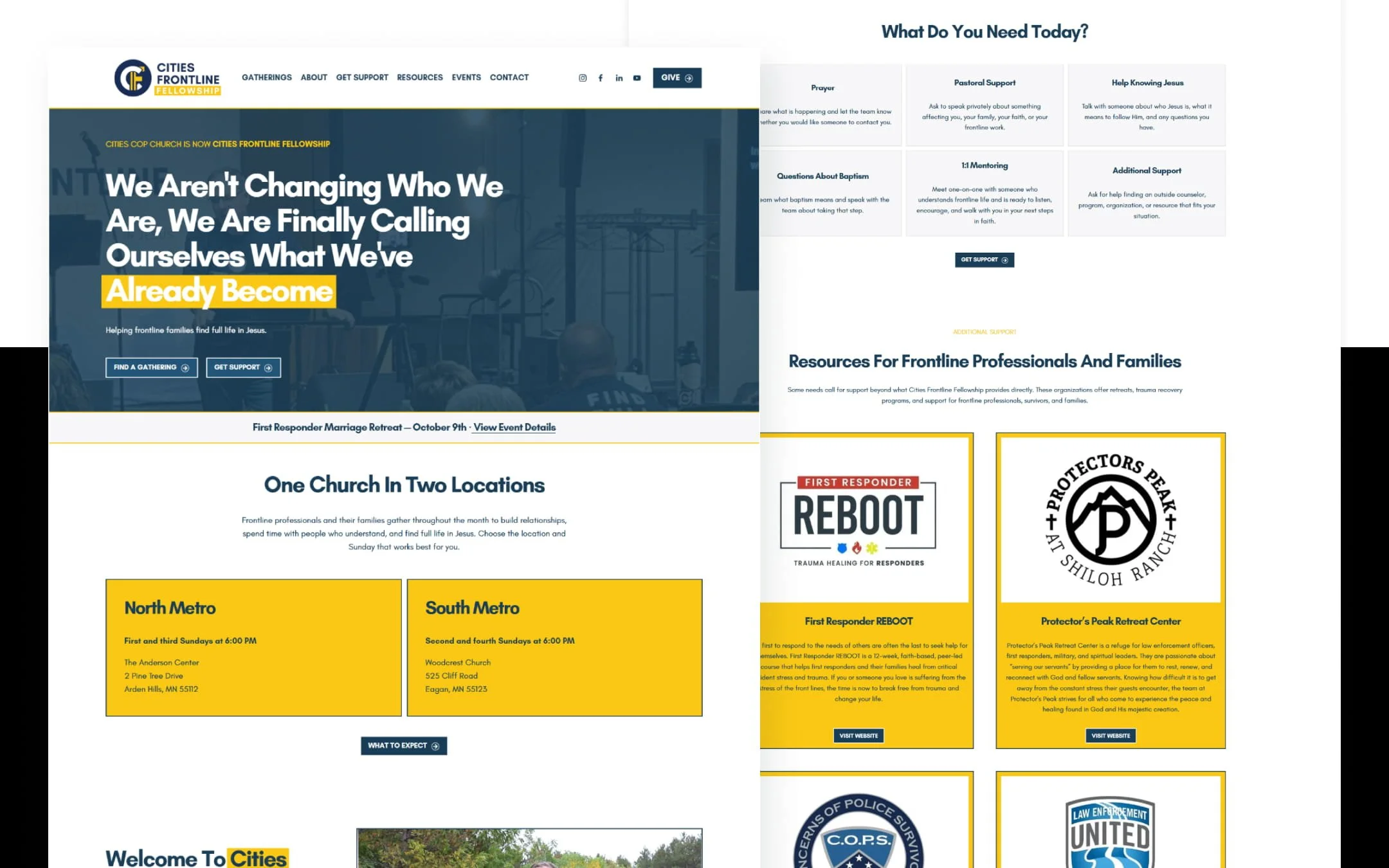
Cities Cop Church had grown into something bigger than its name. It became Cities Frontline Fellowship, and its website needed to grow with it. I built a new Squarespace site of about 25 pages while the old one stayed live. The new site launched on October 9, 2026.
Cities Frontline Fellowship is a faith-based ministry for first responders in the Twin Cities metro area of Minnesota. It started as Cities Cop Church, serving law enforcement. Today it also serves firefighters, emergency medical services (EMS) crews, corrections officers, dispatchers, emergency room staff, and their families. I’m Desmond Haskell of Haskell Digital Services, and I did this project as a contractor for Accordus. Accordus is the agency that created the new brand.
Key Takeaways
I built a new Squarespace site of about 25 pages from August to October 2026, and it launched on schedule.
A rebrand that widens your audience changes more than the logo. The words, menu, and pages all need to change too.
Building the new site separately let the old site, emails, and social links keep working the whole time.
Six kinds of support now live in one Get Support section.
The old web address now forwards to the new one, so people using it still reach the new site.
Project at a glance
| Detail | Project facts |
|---|---|
| Client | Cities Frontline Fellowship |
| Former name | Cities Cop Church |
| Type of organization | Faith-based nonprofit and first-responder ministry |
| Project | Rebrand, website move, and custom rebuild |
| Platform | Squarespace 7.1 |
| Timeline | August to October 2026 |
| Launch | October 9, 2026 |
| Pages built | About 25 |
| Website | citiesfrontline.org |
| My role | Squarespace designer and developer, as a contractor for Accordus |
My work covered planning the pages and menu, designing the site, and writing and editing the copy. I also built the site in Squarespace and set up events and support forms. Accessibility, search setup, custom code, and the move to the new domain were mine too.
Why a new name needed a new website
The new name was meant to show who the ministry had become. The website needed to speak to police officers and also to firefighters, EMS crews, dispatchers, and other frontline workers. It also needed to welcome their spouses and families.
That changed far more than the logo. The site needed new words, a clearer explanation of who it serves, and a new way to organize everything.
The old site also had problems of its own. Its content was brief, and gathering times were hard to find. Years of hidden, outdated, and overlapping pages made it hard to manage. Copying all of that into a new site would have carried the same problems along.
So I started by sorting the old content. I decided what still belonged, what needed rewriting, and what could be combined. Then I built the new layout around the questions a first-time visitor is most likely to ask:
Where and when can I attend a gathering?
Is this for someone in my line of work?
Can my spouse or family come?
What events are coming up?
Where can I ask for prayer or personal support?
What does the ministry believe?
What should I expect on my first visit?
Those questions became the plan for the whole site.
Building the new site while the old one stayed live
The old site and the new site both ran on Squarespace 7.1, the current version of the platform. But this wasn’t a simple facelift of the old site.
I built the new site separately on a Squarespace free trial. Meanwhile, the Cities Cop Church site stayed up for the public. Its social media links, emails, blog links, and outreach materials all kept working during the project.
Once the ministry approved the new site, it moved to its own paid Squarespace plan. It was then connected to the new citiesfrontline.org web address. I wrote up which old addresses needed to forward to the new site. The domain manager then set up those redirects, which automatically send visitors from an old address to the new one. (For a general explanation of redirects, see Squarespace’s URL mappings guide.)
Building it this way gave the team room to restructure and test without disrupting anything the ministry was already sharing.
A menu built around what visitors need
The new main menu has seven sections: Gatherings, About, Get Support, Resources, Events, Contact, and Give.
Gathering details now show up front. Visitors don’t have to dig for meeting times anymore. The homepage introduces the North Metro and South Metro gatherings, with their schedules and locations.
The About section pulls together the ministry’s story, mission, leaders, and statement of faith. A new What to Expect page answers practical questions. It covers service length, clothing, family, arrival and parking, worship, teaching, and prayer.
These changes help someone visiting for the first time. They also still work for regular members looking for an event, a resource, or support.
One place to ask for help
Support was the most scattered part of the old site. Prayer, baptism, pastoral care, mentoring, and questions about faith were spread across separate pages.
I brought six kinds of support into one Get Support section:
Prayer
Baptism questions
Pastoral support and referrals
One-to-one mentoring
Learning more about following Jesus
Other support requests
Each option has a short description and a direct link to the right form. The section is also clear about what the ministry can’t handle in a crisis, and it lists outside resources for those needs.
Now visitors have one private, easy-to-understand place to start asking for help.
Separating regular gatherings from special events
The old site mixed regular gatherings and special events together. I split them apart.
The North Metro and South Metro gatherings happen on a regular schedule. So I set them up as permanent pages with times and locations. Retreats, conferences, and other one-time programs went into Squarespace’s built-in events feature.
This helps visitors tell the difference between a weekly gathering and an event they need to sign up for. Each event also gets its own web address. That makes it easy to share by email, on social media, or with partner organizations.
Bringing the new brand to life on Squarespace
Accordus created the new brand, including the logo, colors, fonts, and overall look. My job was to turn that brand into a working website.
I carried the brand through about 25 pages. That included menus, buttons, videos, cards, forms, event pages, the phone menu, and the footer.
Squarespace’s built-in design tools couldn’t match the brand everywhere, so I added custom CSS. CSS is style code that controls how a page looks. The custom work includes:
Branded dropdown menus that highlight the whole row on hover
Small animated arrows on buttons
Custom menu text on phones
Bordered video players and list cards
Cleaner newsletter and form fields, with clearer required-field markers
Smooth scrolling that turns off for visitors who prefer less motion on screen
A copyright year in the footer that updates itself
I kept the custom work focused on making the site easier to use and more consistent. Nothing was added just for decoration. This kind of work is a regular part of our Squarespace and custom web design projects.
Writing for first responders and their families
The old site used short statements that assumed visitors already knew the ministry. The new site needed to explain more, without sounding stiff.
I wrote and edited copy that explains what the ministry does and who it serves. It answers common questions more directly.
Because the audience grew, I reviewed the wording carefully. I kept references to police officers where the history or context called for them. I also added broader terms like first responders, frontline professionals, spouses, and families throughout the site.
All new copy went through client approval and a quality review by Accordus’s Team Lead.
Building in accessibility, privacy, and search from day one
I didn’t save accessibility and privacy for after launch. They were part of the build.
Accessibility means making the site usable for people with disabilities. The W3C has a helpful introduction to web accessibility if you want to learn more. My work included phone-friendly layouts and readable text sizes. It also covered a clear heading order, image descriptions, and labels on every form field. I checked colors and layouts, and added support for visitors who prefer less motion on screen.
The site also got an updated privacy policy and cookie settings, both approved by the client.
For search, I set up page titles and descriptions, clear web addresses, and image file names and descriptions. I linked related pages together and used wording that connects the old and new names. That’s meant to help people who search for “Cities Cop Church” find the new site.
I also added a custom “page not found” page and kept that page and form thank-you pages out of search results. And I added an llms.txt file. It’s a small text file meant to help AI tools understand what a website is about, based on a proposed standard.
The forwarding plan mattered most. The ministry had used its old web address for years in social posts, emails, blog posts, and outreach. Forwarding the old address to the new site keeps those links useful.
Working with the Accordus team
Accordus’s Team Lead was the link between me and the client. She gathered photos, files, and feedback. She also worked with the graphic designers, quality-check staff, and the domain manager, and passed along client decisions.
I led the recommendations on the Squarespace build, the menu and page layout, content merging, and Squarespace features. I recorded video walkthroughs to explain my work and recommendations before building the next set of pages.
The project moved through six review stages:
Homepage direction and brand
Main page layout and gathering details
Remaining pages, support options, and events
Phone layouts and content review
Internal quality checks and client revisions
Launch prep and a review after launch
Working in stages meant big decisions got approved before they were repeated across about 25 pages.
What you can take from this rebuild
If you’re planning a rebrand or a rebuild, here are the lessons from this project I’d pass along.
A new name means new words, not just a new logo. If your audience is changing, review every page for who it speaks to. Old wording can quietly leave people out.
Build the new site next to the old one. A separate Squarespace site lets you test everything while your current site keeps working. Nothing breaks for the people already visiting.
Plan for your old web address before launch. List every place the old address has been shared. Then make sure it forwards to the new site on launch day.
Organize around your visitors’ questions. Start with what a first-time visitor needs to know. Build the menu from there, not from how your organization is structured inside.
Get approval in stages. Approving the homepage and main pages first saves you from redoing the same change on every page later.
What Cities Frontline Fellowship has now
The new website launched on October 9, 2026, on schedule.
The site is still new, so there isn’t enough data yet to talk about traffic, sign-ups, donations, or search rankings. I’m not making claims about those. What I can confirm is that the finished site fixes the layout and communication problems identified at the start of the project.
The ministry now has a website that matches its new name and speaks to a wider range of first responders. Gathering times and locations are easy to find. There’s one place to ask for help, a reusable events setup, and more information for first-time visitors.
The site works on phones and computers and includes the custom styling, accessibility, and privacy work described above. Search settings are in place, and the old web address forwards to the new one.
You can see the finished Cities Frontline Fellowship website live.
For another nonprofit move, read the Love INC of Cuyahoga County case study.
Planning a Squarespace move or nonprofit rebuild?
Moving a website takes more than copying pages over. You need to decide what stays, what changes, how visitors will find things, and how old links will keep working.
If that sounds like your project, tell us about your website. We’ll look at what you have, who it needs to serve, and what’s changing, then walk you through the next steps.