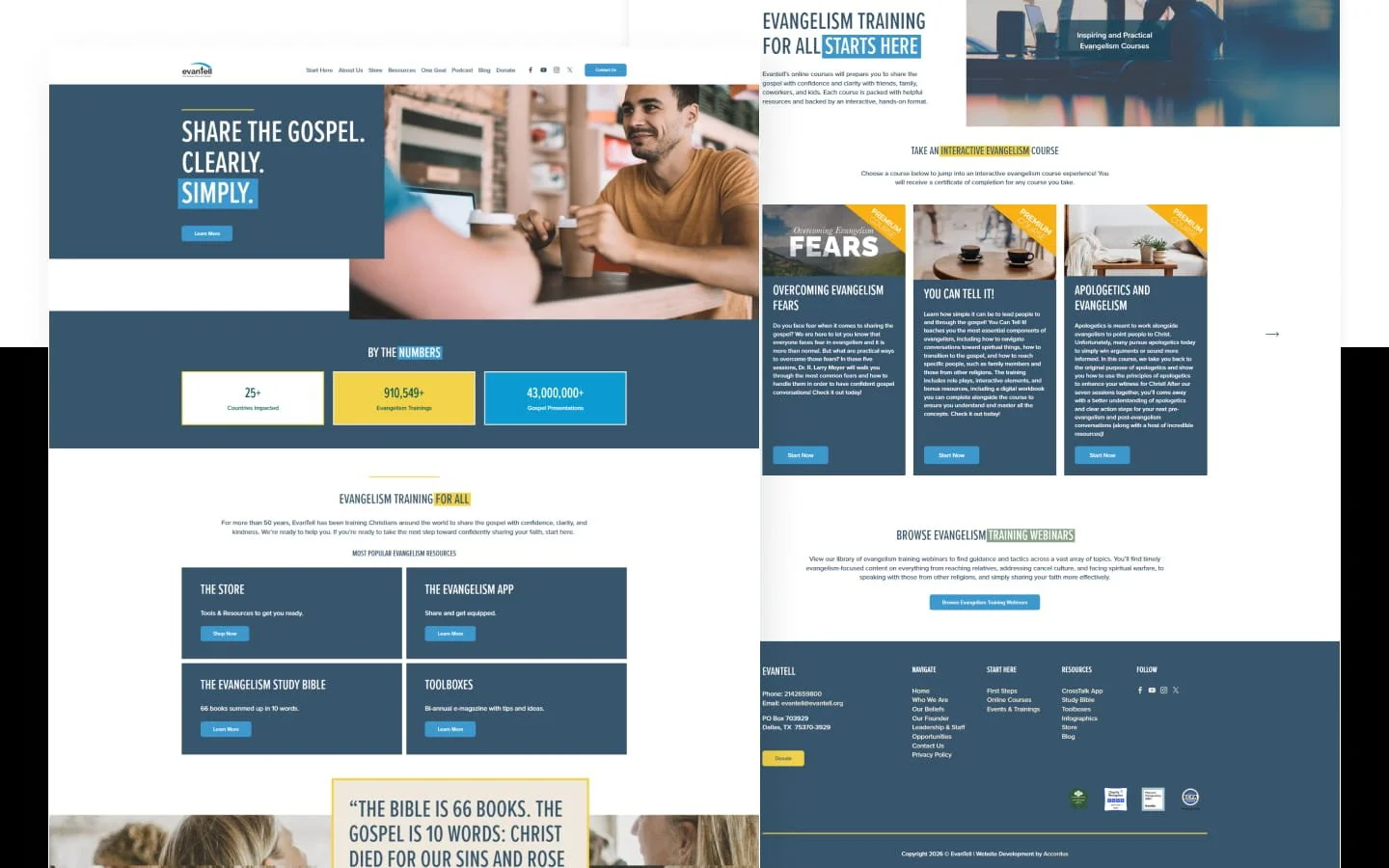
EvanTell had decades of training, resources, and articles packed into a WordPress site that had become hard to manage. I moved it to Squarespace, a process called a website migration, and I did it by hand. That meant rebuilding about 40 pages and the first 60 blog posts. The new site launched on schedule at the end of August 2026.
EvanTell is a faith-based nonprofit that trains Christians to share the gospel. It offers live training, online courses, apps, and a large library of articles. I’m Desmond Haskell of Haskell Digital Services, a Maine web design studio, and I did this project as a contractor for Accordus. Accordus is the agency that created EvanTell’s new brand.
Disclosure: Haskell Digital Services earns referral or partner credit from Squarespace.
Key Takeaways
I rebuilt about 40 pages and moved the first 60 blog posts from WordPress to Squarespace by hand in July and August 2026.
Reorganizing the menu before rebuilding kept the old site’s navigation problems from moving over too.
Moving blog posts by hand let me fix messy formatting, broken links, and images along the way.
Squarespace’s menus only go so deep, so I added custom code for EvanTell’s large resource library.
Getting approval in stages, starting with the homepage, kept the rest of the build on track.
Project at a glance
| Detail | Project facts |
|---|---|
| Client | EvanTell |
| Type of organization | Faith-based nonprofit and evangelism training |
| Project | Move from WordPress to Squarespace, new brand, and custom rebuild |
| Platform | Squarespace (version 7.1) |
| Timeline | July to August 2026 |
| Launch | End of August 2026 |
| Pages rebuilt | About 40 |
| Blog posts moved for launch | 60 |
| Older posts saved for later | More than 100 |
| Blog authors kept | 9 |
| Blog categories kept | 15 |
| Website | evantell.org |
| My role | Squarespace designer and developer, as a contractor for Accordus |
Why EvanTell left WordPress
EvanTell’s old site held a lot of valuable material. The trouble was the system underneath it.
WordPress is a popular website platform. EvanTell’s site leaned on Divi, a WordPress page builder, plus several plugins, which are add-on tools. The layouts felt dated, and the site didn’t work well on phones. Simple edits took more technical effort than the team wanted to spend.
The look also no longer matched EvanTell’s new brand. And the menu made it hard to organize a big collection of training programs. Visitors had to click through several sections that didn’t connect well.
Accordus mainly builds and manages its client sites on Squarespace. Moving EvanTell there meant fewer add-ons to maintain and simpler editing. It also gave Accordus a site it could support the same way as its other clients.
This couldn’t be a page-for-page copy. Rebuilding the old structure would have brought the same menu and content problems along. The site first needed a new plan built around how people actually use EvanTell’s training and resources.
Planning a clearer menu first
Planning the sitemap was one of the most time-consuming parts of the project. A sitemap is the list of pages and how they’re grouped in the menu.
EvanTell serves many kinds of visitors. Some are Christians learning to share their faith. Others are churches looking for live training, people taking online courses, donors, ministry partners, or readers of the article library.
The old menu didn’t separate those needs clearly. I went through the existing pages one by one and grouped them into clearer sections:
First steps for learning to share the gospel
Courses, online workshops, and live training
Who EvanTell is, what it believes, and its team
Gospel resources, apps, videos, and study materials
Guidance on specific evangelism topics
Individual training programs
Blog articles and resource collections
Contact and donation pages
That review showed what to keep, what to rebuild, and what to organize better. Now visitors can go straight to courses, training, apps, publications, the blog, or the donation page. They don’t need to know how the old site was arranged.
Building and approving the site in stages
The project started with a meeting between EvanTell’s founder, Accordus’s Team Lead, and me. We set the goals and the foundation for the new site.
I was trusted with the Squarespace plan and the build. The Team Lead managed the client relationship, coordinated the Accordus team, and gathered feedback.
I didn’t build the whole site before showing it to anyone. I broke the work into stages.
The homepage came first. It set how the new brand would look in Squarespace, including fonts, colors, spacing, photos, buttons, and layout. Once that was approved, I built the main pages, like About, Contact, and the donation pages. Training, course, and resource pages came next, in groups, so similar pages could share the same layouts.
I recorded video walkthroughs and sent updates so the Team Lead could present decisions and collect approvals. The Team Lead also ran the final approvals and quality checks.
Rebuilding about 40 pages
I rebuilt about 40 main pages in Squarespace by hand.
That took more than copying text. Layouts built in Divi can’t move to Squarespace intact. Every page had to be reviewed, rebuilt, and fitted into the new design.
I carried the new brand through the homepage, organization pages, staff and leadership pages, and course and training pages. I also carried it through the resource libraries, buttons, forms, menu, footer, and phone layouts.
Some tools already lived on outside platforms and worked well. These included EvanTell’s donation page, live training pages, and some online courses. Instead of rebuilding them, I linked them into the new menu. Squarespace became the main website, and EvanTell kept the giving and learning systems it already relied on. Deciding what to rebuild and what to link is a big part of our web services, including website migrations.
Moving the blog by hand
The blog needed the most careful cleanup of the whole project.
An automatic import wouldn’t have let me fix the old formatting, remove leftover page-builder pieces, and check every image. So I moved the posts by hand.
The first 60 posts went over for launch. For each one, I rebuilt the article and carried over its author, photos, categories, tags, and search settings. I also kept its web address and checked its links.
Those 60 posts came from nine authors and 15 categories. More than 100 older posts were set aside to move after launch.
Doing it by hand meant I could fix problems as each post moved, instead of carrying them into Squarespace. I reviewed and resized images, renamed files where needed, and added alt text, which describes each image for screen readers. I fixed broken links. Old web addresses were kept the same, or redirected to the new address when they had to change.
The new blog keeps EvanTell’s authors and topics, without the old formatting problems.
Giving a big resource library a deeper menu
EvanTell’s resources go several levels deep. There are broad groups, then smaller collections, then individual training pages. Squarespace’s standard menu folders don’t go that deep.
Squashing everything into one menu would have made it hard to scan. Spreading it across unrelated menus would have broken up the new structure.
So I added custom code that allows extra menu levels and styled it to match the new brand. It keeps the training and resource sections connected to the main menu. I also refined how the menus look and open on computers and phones. This kind of work is part of our custom web design projects.
EvanTell got the menu depth its content needed, without going back to a site full of add-ons.
Building animated number counters
The homepage shows three numbers from EvanTell about its reach:
More than 25 countries impacted
More than 910,549 evangelism trainings
More than 43 million gospel presentations
These are EvanTell’s own figures. My job was how they’re displayed.
The design called for numbers that count up, and Squarespace didn’t have that built in. So I wrote a small piece of custom code. The counters start when a visitor scrolls them into view and count up over two seconds. They finish with commas and a plus sign.
On phones, the three counters stack into one column. I styled similar counter cards for EvanTell’s Evangelism Study Bible and five-year-plan pages too.
Bringing the new brand to Squarespace
Accordus created EvanTell’s new look. My job was to carry it through the whole website.
Squarespace’s built-in design tools couldn’t match the brand everywhere, so I added custom CSS. CSS is style code that controls how a page looks. It handled the colored counter cards, page grids, divider lines, and menus on computers and phones. It also covered footer links, smooth scrolling, and consistent spacing.
I also added code across the whole site for the deeper menu and a footer year that updates itself. Squarespace calls this code injection. Through all of it, the site stays easy for the team to edit in Squarespace.
Getting it ready for phones and Google
I checked every page in Squarespace’s mobile editor. I didn’t just trust the computer layout to shrink on its own. Photos, sections, grids, menus, and spacing were all adjusted for small screens. That fixed the poor phone experience on the old site.
For search, I set up page titles and descriptions, blog search settings, and links between pages. I planned the web addresses and redirects, fixed broken links, and named and described images. I also added structured data, which is behind-the-scenes code that helps Google understand a page. And I added an llms.txt file, a small text file meant to help AI tools understand the site, based on a proposed standard.
Some search tasks were outside my part of the project. Those included submitting the sitemap and setting up Google Search Console and Bing Webmaster Tools. Those are free tools that report how a site shows up in search.
The old WordPress site stayed live during the build. After approval, Accordus’s domain manager, the person who handles web addresses, connected the domain and handled launch. The domain manager also set up the redirects from the plan I provided. That let me stay focused on the website itself.
What you can take from this move
If you’re planning a big website move, these are the lessons from this project I’d pass along.
Fix the menu before you rebuild. If people struggle to find things on your current site, copying it over keeps that problem. Plan the new structure first.
Big sites are worth moving by hand. It takes longer than an automatic import. But it’s the best chance to fix formatting, broken links, and images before they follow you.
Keep tools that already work. If your donation or course platform runs well, link to it from the new site. You don’t need to rebuild everything.
Know where your platform stops. Squarespace covered most of what EvanTell needed. For a few special features, like deeper menus or animated counters, plan for some custom code.
Get approval in stages. Approving the homepage first meant the rest of the pages followed a style everyone had already agreed on.
You don’t have to move everything before launch. EvanTell launched with its first 60 posts and set more than 100 older ones aside for later. A big archive doesn’t have to hold up a new site.
What EvanTell has now
The new EvanTell website launched at the end of August 2026, on schedule.
EvanTell now has a Squarespace site that’s easier for Accordus to manage, with about 40 rebuilt pages. Its courses, training, and resources are easier to find, and the layouts are more consistent. It works better on phones and matches the new brand.
The site also has a deeper menu for the resource library, the animated counters, and links to EvanTell’s existing donation and learning platforms. All 60 launch posts kept their authors, categories, tags, images, links, and search settings. The blog is set up to take the 100-plus older posts, and the site no longer depends on WordPress plugins.
Visit evantell.org to see the finished site.
For more moves like this one, read the Love INC of Cuyahoga County case study or the Cities Frontline Fellowship case study.
Thinking about a big website move?
A large website move takes more than shifting pages from one platform to another. Content needs to be reviewed, reorganized, rebuilt, and tested, without losing what visitors already rely on.
If that sounds like your site, tell us about your project. Let us know what’s on your current site, what needs to move, and what the new one needs to do. We’ll review it and walk you through the next steps.